
|
Partner Integration Spotlight
— A Modern Toolkit for the Modern Advisor — — A Conversation with InsMark Producers — |
A Note from Repredict: From Planning to Placement
A compelling client presentation is an important step, but the work doesn’t end there. Applications, illustrations, underwriting requirements, documents, and follow-up all play a role in moving an insurance case forward.
Repredict and InsMark bring complementary capabilities to the advisor’s workflow. InsMark helps advisors compare planning alternatives and communicate strategies through compelling client presentations, while Repredict provides illustration analytics, case management, document organization, and collaboration tools to support the work surrounding each case.
Together, they help advisors move from evaluating planning opportunities to presenting recommendations and managing cases through the placement process.

With permission, we’re pleased to share the latest article from our partners at Repredict AI, exploring how organized case management, collaboration, and practical AI tools can help advisors move insurance business forward. From managing illustrations and documents to tracking case activity and capturing important conversations, Repredict helps advisors stay organized beyond the initial presentation. Combined with InsMark’s planning and client presentation capabilities, these tools support a more connected workflow from strategy development through case placement.

Repredict × InsMark
How organized cases, connected advisors, and practical AI help keep insurance business flowing
By Repredict — A conversation with InsMark producers

You’ve developed the strategy. You’ve explored the alternatives. You’ve analyzed, compared and generated powerful InsMark “Do It vs. Don’t do It” comparison presentations. Case closed, right? Well, not exactly.
Applications. Supporting documents. Underwriting questions. Revised illustrations. Calls with the client, the agency, and other advisors. Follow-up that has to happen while everyone is also working on a dozen other cases.
Too often, the information is scattered. The latest document is in someone’s inbox. A key conversation lives in a handwritten note. One advisor knows what changed, while the rest of the team is still working from last week’s information.
Staying organized is not separate from selling insurance. It is part of getting the business placed.
Repredict brings case management, files, contacts, notes, and collaboration together—with AI assistance for some of the work that otherwise consumes an advisor’s day.
1. See the whole pipeline—not just the next email
An inbox tells you who contacted you most recently. It does not necessarily tell you which case needs your attention.
Repredict’s Case Manager gives you a broader view. Search your cases, separate your own from those shared with you, and filter by stage, carrier, agency, advisor, or case age. Sort the list and see totals for the business in the current view.
That makes a team review more useful. Instead of starting with “What are we working on?” you can start with more specific questions:
- Which cases are at this stage?
- What business are we working on with this agency?
- Which older opportunities deserve another look?
- What has been updated recently?
The goal is not another report to maintain. It is a practical way to decide where to spend your time.
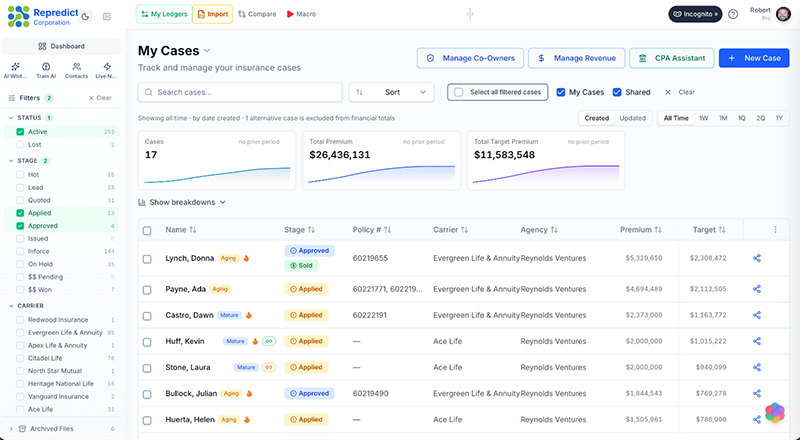
See your own and shared cases together, then narrow the view to the business that needs attention.
2. Give the team one place to understand the case
Opening a case should answer the next question: “Where do things stand?”
Repredict’s Case Details page brings together the insureds, underwriting information, important dates, team members, linked illustrations, files, and case notes.
You can also add custom cards and fields to capture information your practice needs. For example, a team could create fields for an outstanding requirement, the person following up, and the next review date. Cards can be organized into tabs so a more complex case remains manageable.
Just as important, the case is not limited to one advisor’s view. You can share it with other Repredict users and assign the appropriate access—Viewer, Editor, or Co-Owner.
Notes and comments keep the discussion attached to the case rather than buried in a forwarded email chain.
A shared case should reduce the need to ask someone else to reconstruct its history.
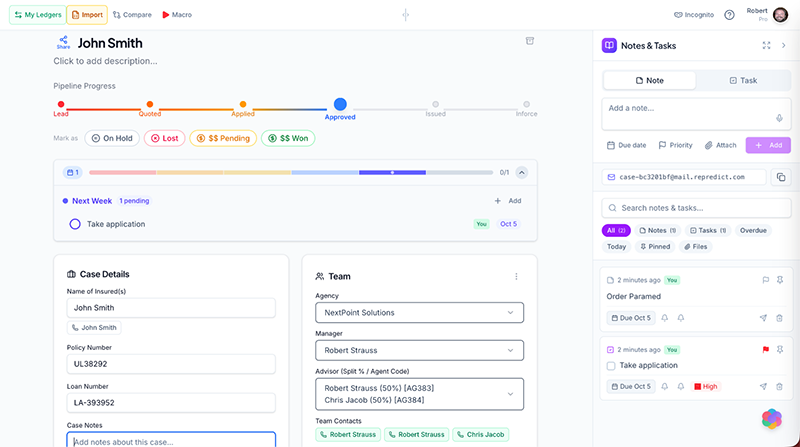
Keep the case facts, team, and working discussion together—so the next person can pick up where the last person left off.
3. Stop hunting for the right document
Insurance cases generate files quickly. Applications, illustrations, supporting records, signed forms, and revised versions all need a reliable home.
Repredict’s hyper-secure case File Cabinet keeps those documents with the case they belong to.
Upload multiple files or drag them in from your desktop. Organize them into folders and subfolders. Add tags. Preview PDFs and images without downloading another copy. Search by name or tag—and, for documents with indexed text, search inside their contents.
When a document changes, replacing it with a new version preserves access to previous versions. That is especially useful when the question is not simply “Where is the illustration?” but “Which illustration are we discussing?”
Access follows the case’s permissions. And when a document needs a signature, a connected DocuSign account lets you initiate that workflow from Repredict. A 24/7 notary integration is also available.
These are practical capabilities with a straightforward benefit: less time looking for information and more time acting on it.
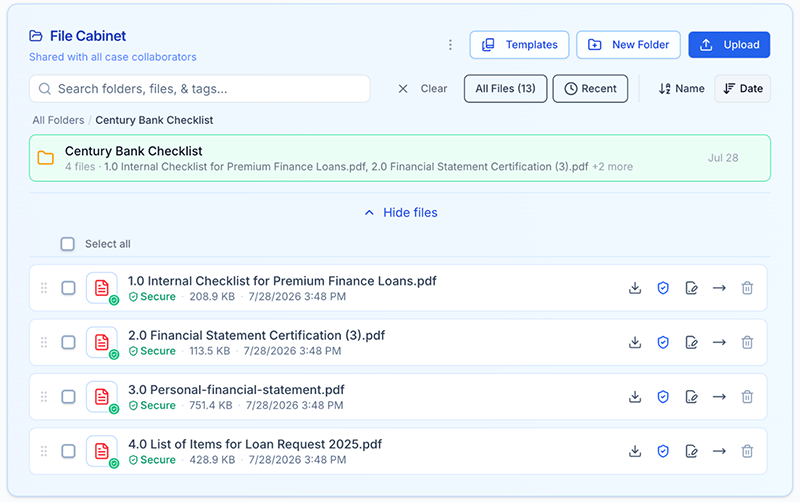
Keep documents organized within the case, with previews, search, and access to previous versions.
4. Capture the conversation before the details disappear
Some of the most important case information arrives at the least convenient time.
The phone rings between appointments. A client clarifies a detail. An agency contact explains what is still needed. Another advisor calls with a change in direction.
You need to capture the information—not stop the conversation to organize a database.
Repredict’s Live Notes opens ready to write. Notes save as you work, and you do not have to choose a contact before starting. After the conversation, you can file the note to a contact, copy it into a case, or share it with the people who need it.
Contacts provides the relationship view: the person’s details, logged conversations, notes, and follow-up. Your personal contact list remains separate from case-sharing permissions; adding someone to Contacts does not give them access to a case.
AI adds another useful layer. Desktop Live Notes supports microphone-based meeting capture and AI-generated meeting notes. Contacts also supports AI summaries of existing logged notes, helping you review the relationship before the next conversation.
With appropriate recording consent, you can spend more attention on the discussion and less on producing a polished recap afterward. Review the AI output, correct anything necessary, and then file or share it.
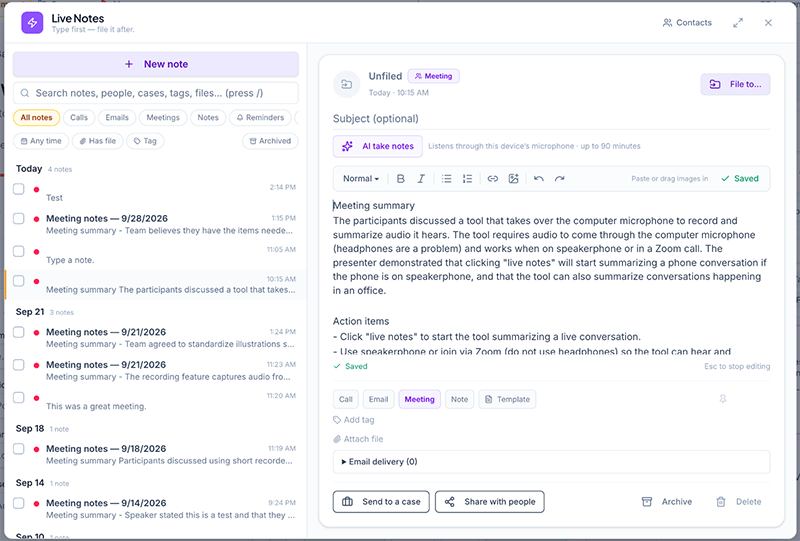
Capture first, organize afterward. Turn the conversation into a reviewed note that can follow the contact and the case.
5. Keep moving when you are away from your desk
A case does not stop moving because you left the office.
Repredict’s mobile experience supports the quick actions that matter between meetings: finding a contact, starting a call or email, checking cases, and capturing a Live Note.
Type a short update or use your phone keyboard’s dictation. File it to the right contact or send it to the case and team while the details are still fresh.
Desktop remains the better setting for more involved work. Mobile gives you a practical way to stay connected without saving every update for the end of the day.
6. Let AI help with the information—not make the underwriting decision
The most useful AI is not always the most dramatic. Sometimes it is the tool that helps you get through the information in front of you.
Alongside meeting notes and contact-history summaries, Repredict’s AI Chat workspace supports questions about documents you explicitly attach, where that feature is enabled.
That can help an advisor work through unfamiliar language, organize a review, or prepare follow-up questions. It does not replace checking the source document, exercising professional judgment, or obtaining the carrier’s answer.
AI can help organize and explain information. The carrier still underwrites the risk, and the advisor still owns the recommendation.
Combined with a shared case record, this creates a more useful workflow: capture the information, review it, keep it with the case, and make it available to the right people.
Better Together: From Presentation to Placement
In our previous article, we explored how Repredict and InsMark work together to turn illustration data into a compelling client presentation.
That relationship extends beyond the presentation itself.
InsMark helps communicate a detailed planning strategy. Repredict generates fast what-if scenarios, and helps keep the supporting casework organized—the illustrations, documents, conversations, and collaboration that surround it.
No platform can eliminate every underwriting delay or guarantee a sale. But advisors can reduce avoidable confusion: misplaced documents, disconnected notes, and teammates working without the latest information.
The client should not have to feel the complexity behind the case. An organized team makes that easier.